Copy a Public Story Link
Start with a public TikTok username, profile URL, story link, or short link. TikView only works with supported public content and does not unlock private stories.
Start with a public TikTok username, profile URL, story link, or short link. TikView only works with supported public content and does not unlock private stories.
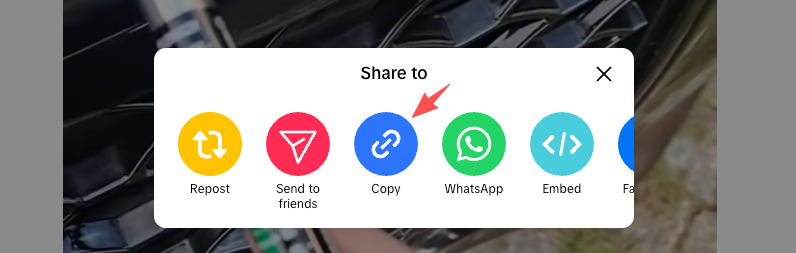
Use the free TikTok story viewer search box to resolve the public link in your browser without signing in, installing an app, or entering a password.

When the public destination is supported, TikView opens a browser-friendly result for reviewing public stories, creator context, and visible public media.
TikView is built around one job: opening supported public TikTok stories in a clean browser view. It accepts public usernames, profile URLs, story links, and short links, then resolves the public destination when the link is supported.
Use TikView when you want to view TikTok stories without signing in through this site. The viewer does not ask for passwords, verification codes, account recovery details, or private account access.
Open supported public stories from Safari, Chrome, Edge, or another browser on iPhone, Android, iPad, or desktop. You do not need to install an extra app or browser extension.
TikView is not a private story unlocker. It works with supported public links and does not bypass private accounts, blocked profiles, deleted stories, or platform restrictions.
Story viewing is the main flow. If a supported public post returns downloadable media, TikView can also surface MP4 or MP3 actions for later reference.
TikView is built for public story access, not private account access: it does not ask for your TikTok password, unlock private content, bypass platform restrictions, or force unavailable stories to appear. For saving public media as MP4 or MP3, the TikTok downloader page handles that workflow, and for browsing a public account without signing in, the TikTok profile viewer page is the focused entry.
These guides explain the practical differences between viewing public stories, checking public profiles, and saving supported public MP4 or MP3 media.
Learn how to save audio from supported public TikTok posts with TikView, without installing an app or signing in.
Learn how TikView helps you open supported public TikTok stories, profiles, videos, and download options without signing in.
A TikTok story viewer is a browser tool for opening supported public TikTok stories without signing in. TikView focuses on public story links and public creator pages only.
Paste a public username, profile URL, or story link into TikView. If supported public story data is available, the viewer opens it in your browser without requiring a TikTok login.
TikView lets you open supported public stories from the browser without signing in through this site. It does not ask for a personal account, password, or verification code.
TikView does not require you to log in with a personal TikTok account. It only attempts to open supported public content, so it cannot provide private viewer-list features or account-specific story interactions.
No. TikView does not bypass private accounts, friends-only stories, login screens, deleted content, regional restrictions, or platform access controls.
Yes. TikView runs in mobile browsers on iPhone, Android, iPad, and desktop. You do not need to install an app or browser extension to try a supported public link.
You can paste a public username, profile URL, story link, short link, or standard video link. TikView resolves supported public destinations and opens the matching viewer page when data is available.
TikView is primarily a TikTok story viewer. Download options appear only when supported public media is returned and a safe MP4 or MP3 action is available.