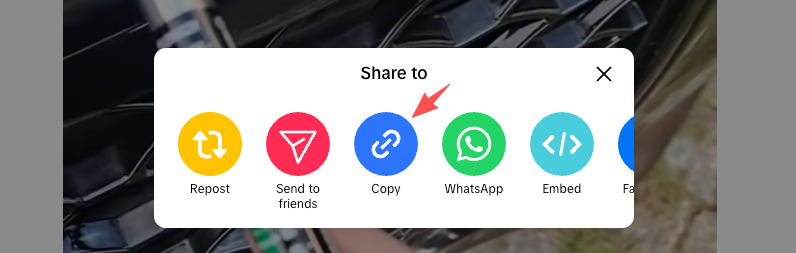
Copy a Public Video Link
Find a public TikTok video, username, or short link that you want to download for supported public media.
No Account. No App. Direct MP4 + MP3 from Public Posts.
Find a public TikTok video, username, or short link that you want to download for supported public media.
Use the TikView downloader search box to resolve the public link in your browser without installing an app or signing in.

Confirm the public media result, then pick the MP4 video action or MP3 audio action when supported public media returns safe download data.

TikView focuses on supported public TikTok media. Use this downloader when you want to save public MP4 video or MP3 audio, or use the TikTok story viewer when your first job is opening supported public stories in the browser.
Paste a supported public video link or short link to resolve available media actions without signing in through TikView.
When supported public media returns audio data, TikView can surface an MP3 action for saving sound separately from the video.
Open the resolved public media first so you can confirm the correct video before choosing a download action.
When you need account-level context instead of a single media file, use the TikTok profile viewer for public creator pages.
TikView is built for public media workflows, not private access. The downloader cannot force unavailable media to appear, bypass restrictions, or recover deleted content.
The TikView TikTok downloader is a browser tool for resolving supported public TikTok links and showing MP4 or MP3 actions when public media data is available.
Paste a public TikTok video link, username, profile URL, or supported short link into TikView. If supported public media is returned, choose the available MP4 or MP3 action.
Yes, when supported public media returns audio data, TikView can show an MP3 action for saving the audio only.
It depends on the public source data. TikView surfaces what the supported public media data returns and does not promise watermark removal for every link.
Yes. TikView runs in mobile browsers on iPhone, Android, iPad, and desktop, so you can try supported public links without installing an app.
No. TikView does not bypass private accounts, friends-only videos, deleted posts, restricted content, login screens, or platform access controls.
TikView supports public usernames, profile URLs, video links, vm.tiktok.com short links, and vt.tiktok.com short links when they resolve to supported public content.
No. TikView runs in your browser and does not require a separate app, extension, TikTok login, password, or verification code.